
Apple has updated its support documents to confirm the maximum battery cycle count for the new MacBook Neo. Here are the details.
First: What is a battery cycle?
In short, each battery cycle refers to one or more charging periods during which a Mac laptop uses 100% of its battery capacity.
Apple explains it this way:
For example, one day you might use half of your laptop's charge and then fully recharge it. If you do the same thing the next day, it counts as one charge cycle, not two. In this example, it may take a few days to complete one cycle.
In other words, if you use 50% of the battery today, recharge it, then use 30% tomorrow and recharge again, and finally use 20% the next day, this corresponds to one full battery cycle. Meanwhile, the Mac has been charged three times, and the battery level has never dropped below 50%.
So what about the MacBook Neo?
According to Apple, the new MacBook Neo features a 36.5 watt-hour lithium-ion battery, which allows the device to operate for up to 16 hours for video streaming and up to 11 hours for wireless web browsing.
Today, Apple added the maximum charge count for the MacBook Neo by updating the support page that determines the battery cycle count for Mac laptops.
According to the document, the maximum cycle count for the MacBook Neo is 1,000, which means it will be considered "depleted" after 1,000 battery cycles; in that case, it will likely need to be replaced.
Importantly, this does not mean that the battery will immediately stop charging after reaching the 1,000 cycle limit; rather, its ability to hold a charge and provide energy will be significantly worse than before.
What does this mean in practice?
This will certainly vary widely depending on how you use your Mac. In practice, if you go through one full battery cycle each day, reaching 1,000 cycles will take about 2.7 years.
For lighter usage, at about 0.3 cycles per day, this timeframe could extend to around nine years.
Finally, 1,000 battery cycles is currently the highest offered by Apple, and the MacBook Neo stands alongside most MacBook, MacBook Pro, and MacBook Air models that have been on sale since 2009. Previously, battery cycle limits ranged from 300 to 500.
How can I check the battery cycle count on my Mac?
Here are Apple's official instructions for checking the battery cycle count on your Mac:
- Hold down the Option key and click the Apple menu , then select System Information.
- In the Hardware section of the System Information window, select Power. The current cycle count is listed in the Battery Information section.
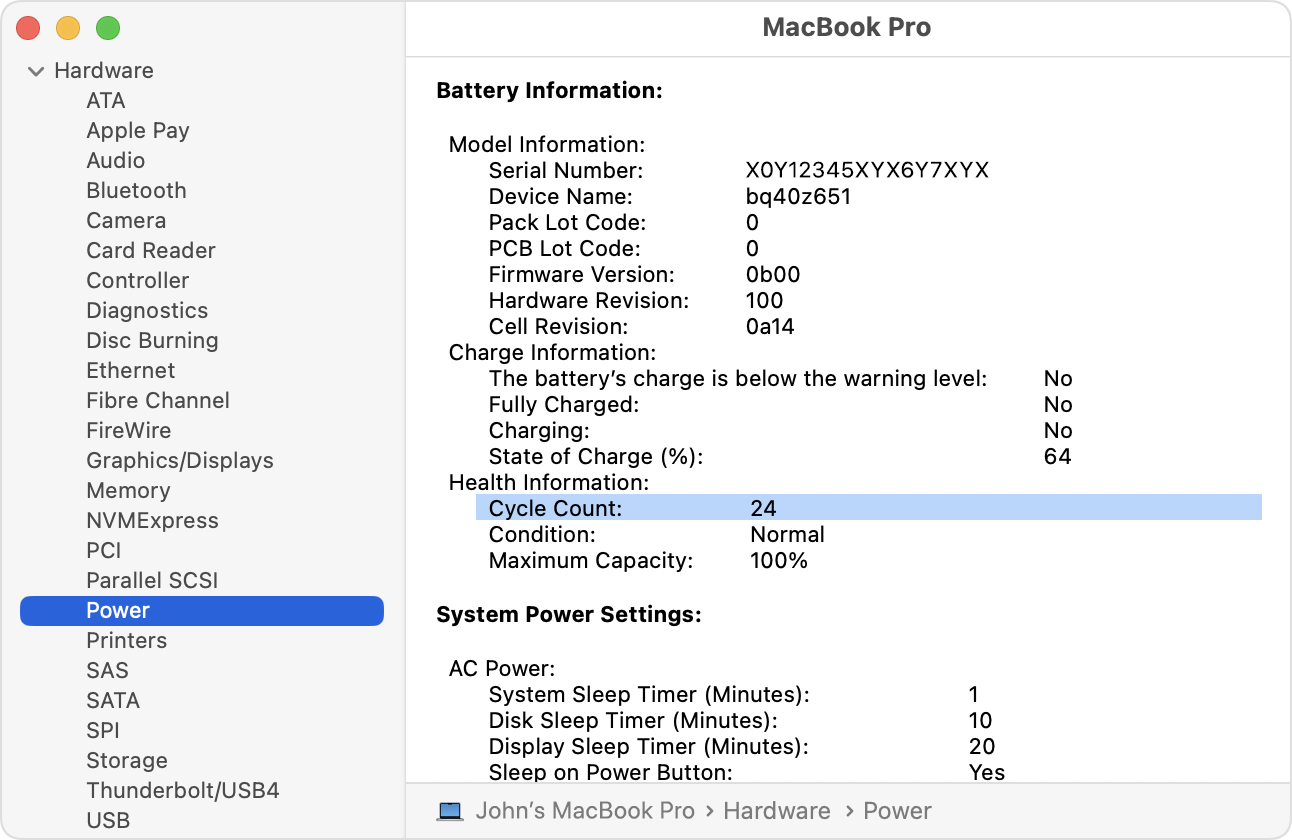
To learn more about battery cycle counts for Mac laptops, follow this link. Also, don't forget to check out the 9to5Mac review of the MacBook Neo.
Products Worth Checking on Amazon
- David Pogue – 'Apple: The First 50 Years'
- Logitech MX Master 4
- AirPods Pro 3
- AirTag (2nd Generation) – 4 Pack
- Apple Watch Series 11
- Wireless CarPlay Adapter




































Comments
(10 Comments)