Google’s Gemini AI application is consistently one of the top three iPhone applications on the App Store. Starting today, Gemini is also available as a dedicated Mac application.
Gemini Mac Application Includes Keyboard Shortcut for Instant Access
Previously, proper access to Gemini on Mac was only possible through the Chrome browser or via the web.
The official Gemini Mac application promises to deliver a significantly improved experience. This starts with instant access via the keyboard shortcut Option + Space.
The Mac application also includes great tools like screen sharing for better context, a customizable menu bar, and Dock access, along with much more:
- Customizable Shortcuts: Press Option + Space to open the mini chat or Option + Shift + Space for the full chat experience. You can change both shortcuts from Settings.
- Menu Bar: Select the Gemini icon in the menu bar at the top of your screen.
- Application Dock: Launch the application directly by clicking its icon in the Dock.
Gemini is a ‘100% Native Swift’ Application
More customization options include the ability to open new chats in mini chat or main window, reset the mini chat based on a time interval, and select from several voices for voice responses.
Gemini is also a “100% native Swift” application for Mac, meaning it has been specifically developed for Apple’s platform.
We are introducing Gemini on Mac.
— Josh Woodward (@joshwoodward) April 15, 2026
We heard your feedback. We formed a small team. They developed over 100 features in less than 100 days. 🤯
100% native Swift. Lightning fast.
Let us know what you think! pic.twitter.com/BxS4WLSn5V
Google highlights several key features for Gemini on Mac:
- Get Quick Answers: Gain information by asking questions instantly, without opening a browser.
- Create Content Drafts: Generate ideas, write emails, create documents, or prepare engaging social media posts.
- Summarize Information: Quickly extract key points from long articles, web pages, or documents.
- Brainstorm Ideas: Use Gemini as a creative partner to explore new concepts and generate innovative solutions.
- Get Coding Help: Write code, debug, or understand complex programming concepts in various languages.
- Analyze Images: Upload images and ask Gemini questions about them or use them to generate new ideas.
Google also notes that “more features are on the way.”
Here’s a look at the quick access entry menu and some sub-menu options:
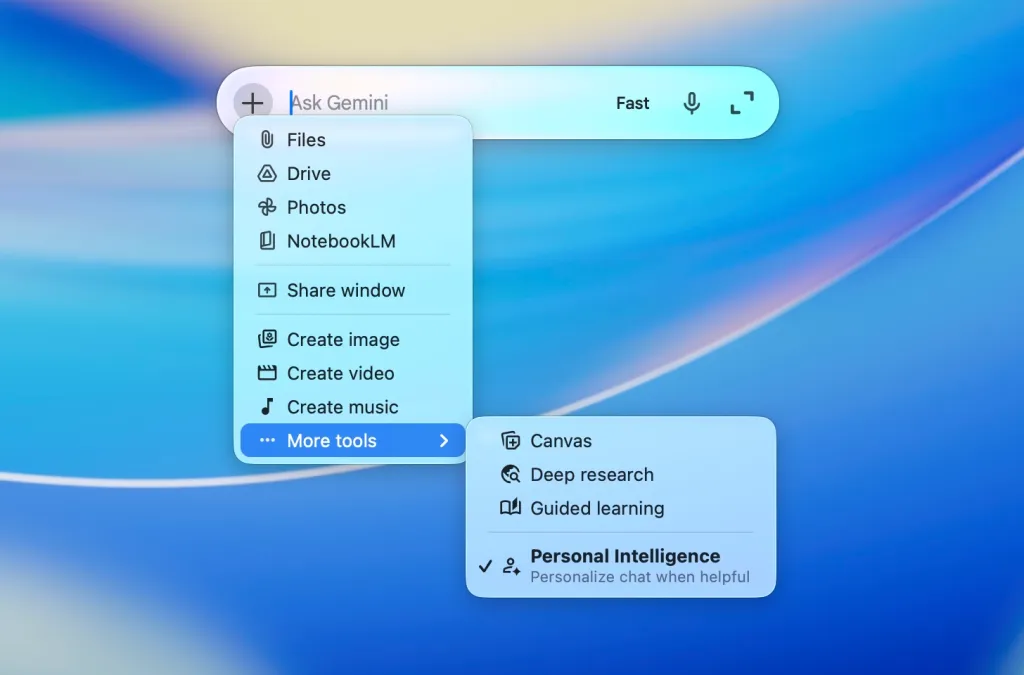
You can download Gemini for Mac for free from here. It works on macOS 15 Sequoia or higher.
Gemini Will Power Enhanced Siri and Apple Intelligence
Beyond the new Mac application, Google’s Gemini will enhance upgraded Siri and Apple Intelligence features along with iOS 27 and macOS 27 later this year. We will learn more about these at WWDC 2026 on June 8.
Apple first introduced Apple Intelligence as part of iOS 18 at WWDC 2024 on June 10, 2024. Apple has rolled out most of the Apple Intelligence features in iOS 18.1, iOS 18.2, iOS 18.3, and iOS 18.4.
However, Personal Intelligence did not make it into the iOS 18 release cycle. The in-app action and screen awareness features that Apple first announced were also not included.
Apple officially postponed the “more personalized” version of Siri a year ago, on March 7, 2025.
Later, on January 12, 2026, Apple and Google announced that the two companies are collaborating on a Gemini-powered upgrade for Siri and Apple Intelligence:
“Apple and Google have entered into a multi-year collaboration where Apple’s next-generation Core Models will be based on Google’s Gemini models and cloud technology. These models will help power future Apple Intelligence features, including a more personalized Siri this year.
After careful evaluation, Apple determined that Google’s AI technology provides the most capable foundation for Apple Core Models and is excited about the innovative new experiences it will unlock for Apple users. Apple Intelligence will continue to work on Apple devices and Private Cloud Computing while maintaining Apple’s industry-leading privacy standards.”
Apple is expected to introduce a suitable Siri application for iPhone, iPad, and Mac as part of the new system.
We are introducing Gemini on Mac.
— Sundar Pichai (@sundarpichai) April 15, 2026
This is the first time we’ve brought @Geminiapp to the desktop. The team developed this first version in collaboration with @Antigravity and it transformed from an idea into a native Swift application prototype in just a few days.
More features are on the way! pic.twitter.com/YRy0Pqq6zo
Do More with Your Apple Products
Apple AirTag 2 | Add Find My tracking for keys, bags, bikes, and more
Beats USB-A to USB-C Cable | Official CarPlay cable
Wireless CarPlay Adapter | No need to plug in anymore
AirPods 4 | Apple’s most affordable wireless earbuds
Astropad Rock Paper Pencil | iPad screen protector + Apple Pencil tips
Withings Body Comp | Best smart scale for Apple Health























Comments
(9 Comments)