Overcast, the popular third-party podcast client, has started to roll out a major new feature in its latest update: transcripts are now available.
Transcripts Now Available for All Users in Overcast
Overcast version 2026.04 was released today on the App Store and brought an important new feature: transcripts.
Last month, we learned that transcripts were coming in Overcast's beta version. However, now this feature is available for all users using the latest update.
You can download Overcast from the App Store here.
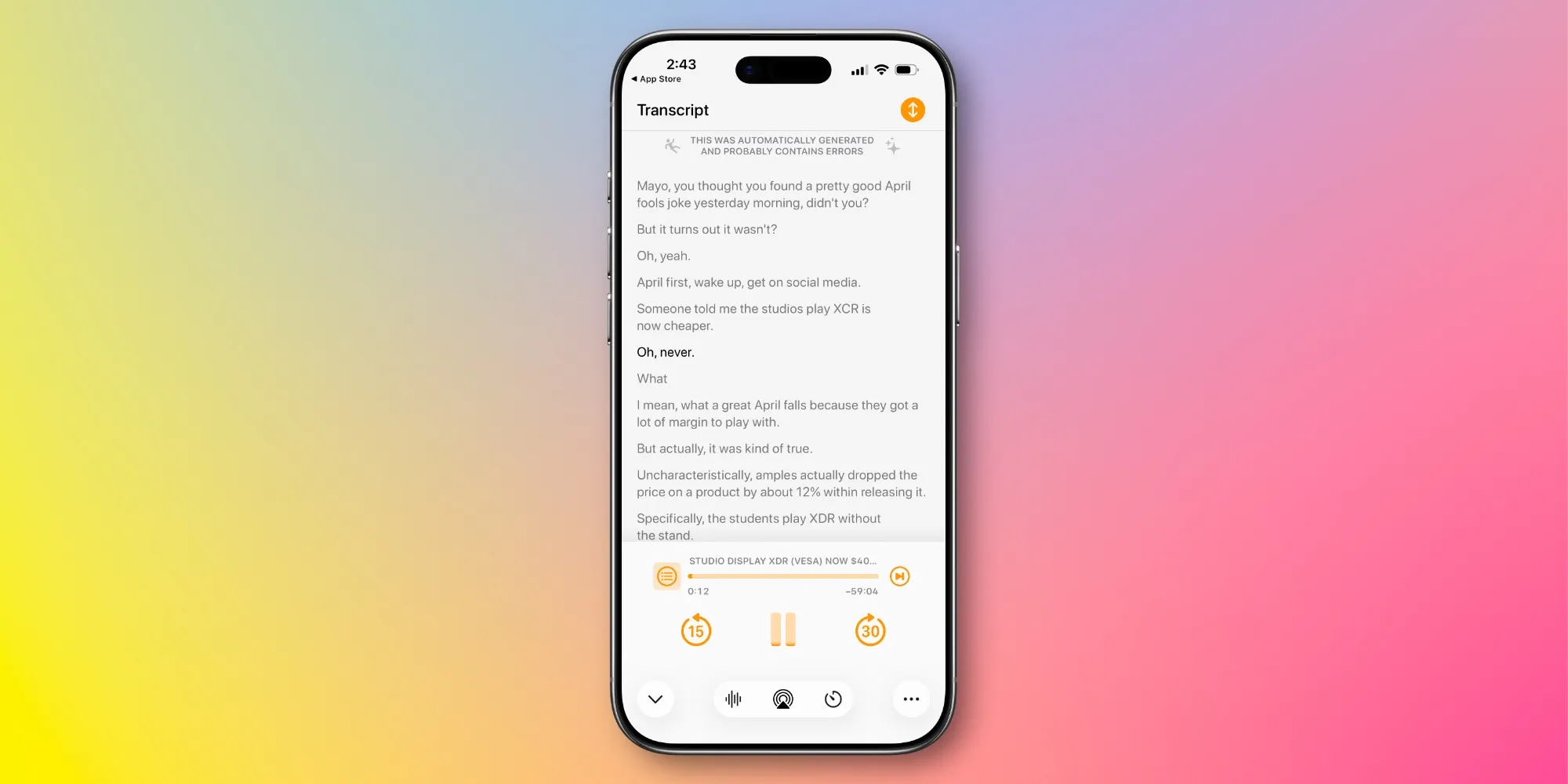
Transcripts are accessible by swiping left while viewing the podcast artwork. If the show supports episode segments, the transcript appears on the right side of the segment screen.
Similar to Apple Podcasts, transcripts in Overcast will scroll live while listening to an episode, so everything you see on the screen will always match what you hear. You can also tap on any part of the transcript to jump to that section.
Developer Marco Arment notes that transcripts are available for "most podcasts," but if a show does not yet have a transcript, AI-compatible devices running iOS 26 can automatically generate the transcript.
Additionally, Arment shared that the following improvements are on the roadmap:
- Transcript search
- AI-based transcript analysis such as summaries, automatic segments, etc.
- Captioned clip sharing
What do you think about Overcast's new transcript feature? Share with us in the comments.
Best iPhone Accessories
- 10-Year AirTag Battery Case 2-Pack
- MagSafe Car Mount for iPhone
- AirPods Pro 3
- Apple's New AirTag 2 (Single/4-Pack)
- 100W USB-C Fast Charging Power Adapter



![User Experience: There's a Feature I Looked for in This MagSafe Battery [Video]](/resimler/kullanici-deneyimi-bu-magsafe-bataryada-aradigim-bir-ozellik-var-video.jpg)













Comments
(1 Comment)